Retirement planning for iPhone, iPad and Mac

Know when you can retire, and how much you can safely spend.

Longlight runs your household's money month by month to the end of the plan, works out every year's federal and state taxes, and tests the result against 10,000 simulated market futures.

Coming soon See what's inside

Free to download. No account needed.

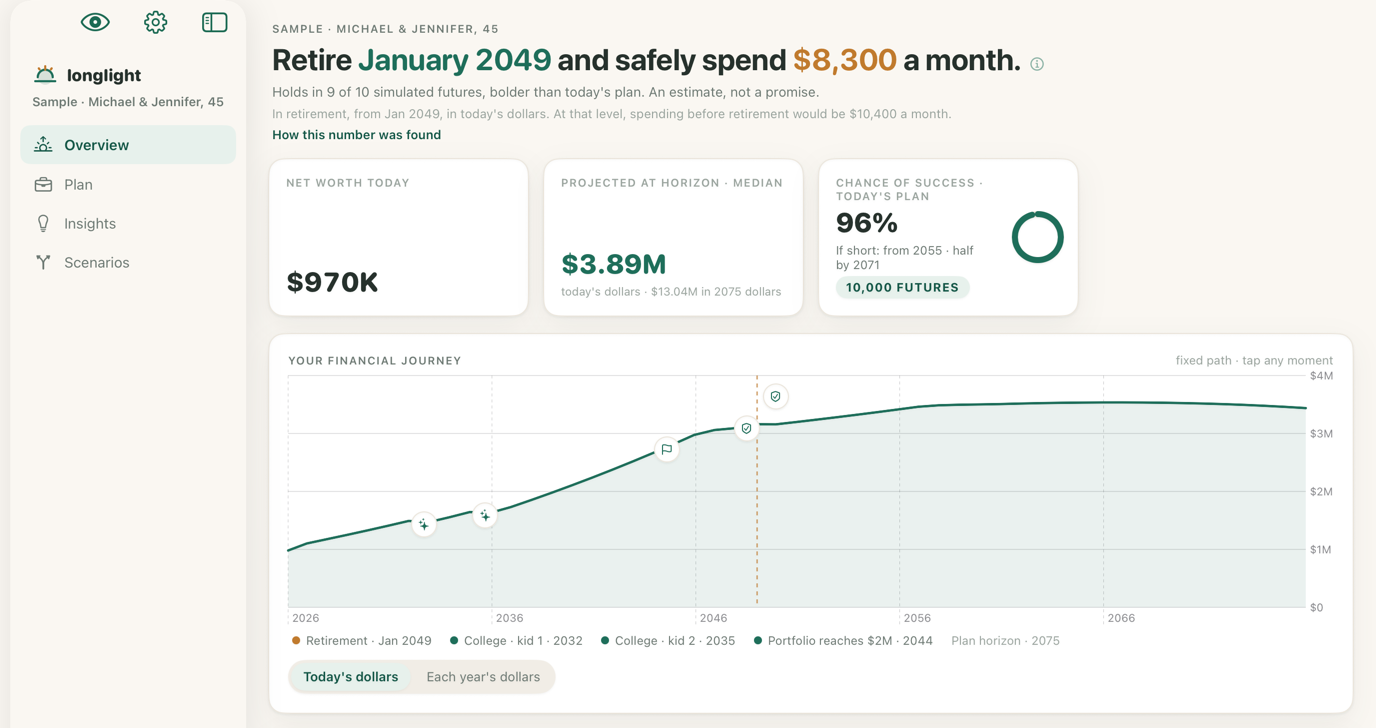
Longlight's Overview on iPad: Retire January 2049 and safely spend $8,300 a month, with net worth today, the projection at the plan's horizon, a 96% chance of success and the financial journey chart. The same Overview on iPhone.

The Overview for a sample household, Michael, 45, and Jennifer, 43.

What you get

Your whole retirement, planned in one place

Enter your paychecks, savings, home, children and goals. Longlight takes it from there, month by month to the plan's last year.

Chance of success

See the odds, and when a plan would run short

Longlight runs your plan through 10,000 simulated market futures and counts how many cover every expense to the end. For the futures that fall short, it shows the years the money would run out.

  • The range of outcomes year by year, in today's dollars
  • When the lean futures run short, not only how often
  • Weighted by the chance someone is alive to need the money
The Chance of success page on iPhone: the share of simulated futures that covered every expense, and a fan chart of net worth across them.

Taxes Pro

A tax return for every year of the plan

Year by year, Longlight fills in a federal return line by line, plus your state's, and pays each bill from the next January's cash. Brackets, deductions and thresholds are the IRS's 2026 figures.

  • Required minimum distributions and Roth conversions
  • Social Security taxation and the Medicare surcharge
  • All 50 states and the District of Columbia
The Taxes page on iPhone: the income tax for each year of the plan as a bar chart, and the year's return beneath it.

History replay Pro

Your plan, through every market since 1871

History replay starts a copy of your plan in 1871 and runs it through the markets and inflation that followed, then from 1872, and from every later year with enough history to reach your plan's end.

  • See which start years held and which ran short
  • 1929, 1966, 1973, 2000 and 2008 kept as presets
  • Robert Shiller's monthly series, from January 1871
The History replay page on iPhone: one line of net worth for each start year, with the leanest starts picked out.

Lifetime cash flow

Where each year's money comes from, and where it goes

Pick any year of the plan. Income and withdrawals sit on one side, spending, debt, savings and taxes on the other, so a year's money reads at a glance.

The Lifetime cash flow page on iPhone: one year's money flowing from income and withdrawals to spending, debt, savings and taxes.

And the tools to decide what to do next

  • Scenarios Pro

    Make scenarios of the plan, move the sliders, and compare them side by side.

  • Every Social Security claiming age Pro

    Your plan re-run at every claiming age, and what each leaves at the horizon.

  • The Roth window Pro

    Room under each bracket top, Medicare cliffs included, year by year.

  • Withdrawals and RMDs Pro

    Which account funds which year, and when required distributions begin.

  • Check-ins against the plan Pro

    Enter the balances you actually see and read whether you're ahead or behind.

  • The PDF report Pro

    Assumptions, charts, numbers and the methodology, with the disclaimer on every page.

Why you can trust the numbers

Every rule comes from an official source

A retirement plan is only as good as its tax rules. Longlight's come from the documents themselves, and you can check each one.

  • 160

    Source documents

    Rules and tables come from the IRS, the Social Security Administration, federal regulations and the states' own tax booklets, listed with their editions and dates.

    Browse the sources
  • Tested against official examples

    The tests behind each tax and benefit rule reproduce the worked examples its source document prints, and the tables are checked against the documents by hand before a release.

  • The method, published

    How Longlight works explains how each number is computed, and lists what the app leaves out.

    Read how it works

Privacy

Your plan stays on your devices

There is no account to create and no Longlight server to send your plan to. The app has no networking code at all.

Read the privacy policy
  • No sign-up and no account
  • No analytics, ads or tracking
  • iCloud sync if you want it, with amounts in encrypted fields
  • Face ID lock, and a switch that hides amounts
  • Export the whole plan as a file at any time

Free and Pro

Free to start. Pro when you want more.

The numbers are the same on both. One purchase covers iPhone, iPad and Mac.

Free

Your whole plan, taxes included

  • Your retirement month and safe monthly spending
  • Chance of success from the full 10,000-future run
  • Net worth and Lifetime cash flow
  • Any number of plans
  • iCloud sync, Face ID and file export

Free to download, with no time limit.

Pro

Every page and tool

  • Everything in Free
  • Taxes, filing by filing
  • Scenarios side by side
  • History replay since 1871
  • Social Security, the Roth window, Withdrawals and RMDs
  • Check-ins and the PDF report

Yearly, monthly or once. The yearly plan starts with a free week for first-time subscribers. Prices are shown in the app.

Coming soon

Questions

Before you download

Is Longlight financial advice?

No. Longlight is an educational planning tool. It shows where your own numbers and assumptions lead. Before acting on a result, check it, and consider a fee-only fiduciary advisor or a CPA.

Where is my plan stored?

On your devices. There is no account and no Longlight server. If you turn on iCloud sync, your plans move between your devices through your own iCloud, with the amounts in encrypted fields.

How current are the tax rules?

Federal brackets, deductions and thresholds are the IRS's figures for 2026, and the state tables are for tax year 2025. They are held fixed for the plan's later years and updated with the app.

What is free, and what is in Pro?

The free app runs your whole plan, taxes included, and shows the Overview, Chance of success, Net worth and Lifetime cash flow. Pro opens the other pages, scenarios, check-ins and the PDF report. See everything in Pro.

Which devices does it run on?

iPhone, iPad, and a Mac with Apple silicon. One purchase covers all three, and iCloud sync, if you turn it on, keeps your plans in step.

What does Longlight leave out?

A few things on purpose, such as married filing separately, stock options and state estate taxes. The full list is on How it works.

Find out when you can retire.

Download Longlight free for iPhone, iPad and Mac.

Coming soon